Week 5
I. Goals (Revisited)
- My primary goal in conceiving this project was to create a
visualization tool that allows you to understand how a neural
network is solving a particular problem. One can imagine a problem (say
handwriting recognition) for which there exists no obvious algorithm,
yet that neural networks might be trained to solve. By looking at how
a neural network solves this problem, it may be possible to gather
insights into the problem itself, to come up with ideas for algorithms, or
to train the networks more efficiently.
- A secondary goal is to aid convergence when training a set of networks.
In my own limited experience with neural networks, I have found it very
difficult to determine sources of error. The population size, number of
nodes, network architecture, size of training set, and complexity of the
training problem can all lead to non-convergence or plateaus, and there
is no easy way to determine which is at fault.
II. Target
- To satisfy the first of the goals listed above, I propose to extend
my prototype circular network visualization to animate the activity of
a network given arbitrary inputs. The animation would take the form of
fluctuations in the node activity levels (white circles). This, in
combination with the opacity-based rendering of weights, should make it
clear how a network produces its output.
- The second goal can be partially satisfied by the fitness graphs
I have already prototyped. I have also proposed family trees, and the
display of volatility for each edge weight.
- My goal, then, is to create a single program which allows the user to
input a training file (a set of inputs and corresponding outputs), to
specify training parameters (population size, number of nodes, network
architecture, mu, lambda, etc.) and to run a training session. Real-time
graphs will provide information on fitness and diversity. The user will
be able to pause the simulation at any time and examine individual
networks. Based on this information, the user may change the population
size, increase volatility, modify edge weights, what have you.
III. Graphing Developments
- Integrated Prof. Rana's neural network code into the ES package.
- Added menu option to switch between sigmoid, linear, and logarithmic
scale. Default of logarithmic seems to be best.
- I trained some neural networks to approximate a sine wave. First I
used ES: (10,100), producing the following angry graph:

Using ES (10+100), however, generated much better results:
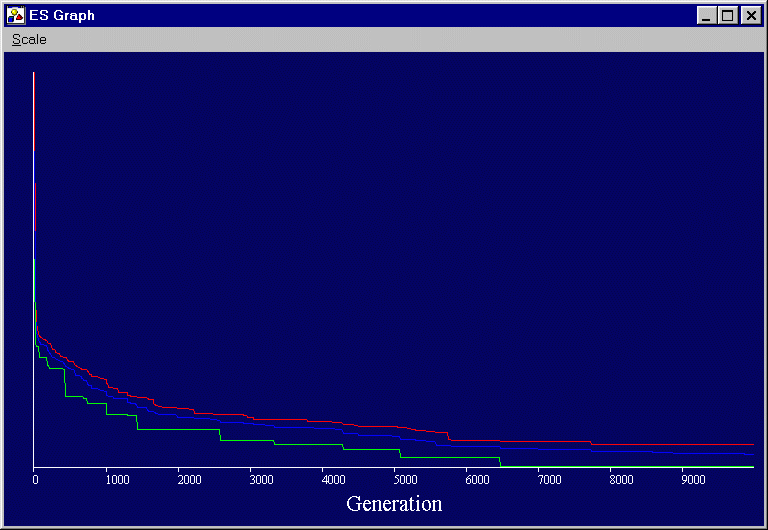
- Both of these graphs use the logarithmic scale.
- I have neglected to put scale information on the vertical axis,
because I just realized that it will be much easier if I switch to
normalized fitness scores. By computing a Pearson correlation between the
expected and actual outputs, you can come up with a fitness score that
always ranges from 0 to 1. This will make graphing easier, however it
invalidates some of the work I have already done. The sigmoid scale will
no longer be useful; I may replace it with a square-root scale.