Week 9
I. A Confession
Last week I displayed some seemingly impressive results involving the
4-bit parity problem. Due to an error in the training file, however, the
network was actually only solving for a small subset of all the samples.
The problem resulted from my accidentally using the tab key to separate
two sample values, rather than the space. This caused my
LoadTrainingSet()
function to return error upon parsing the sixth sample, leaving the
remaining unparsed samples at their initialized values of zero. The error
code was of course unchecked by the calling routine.
To prevent this and all similar problems in the future, I have (a) added
support for the tab key and (b) added code to pop up an error window
whenever there is an error loading the training set. In retrospect, it
should have been clear that the 4-bit parity problem cannot be solved by a
single-layer network, since it is a superset of the XOR problem, which
we know cannot be solved with a single hidden layer.
II. The Saga Continues
- I have added a mutation slider control below the plot window that
allows you to adjust the average sigma values for the current population.
- By popular demand, a vertical scale has been added to the graph.
- In the network monitor window, you can now scroll through the different
samples in a training set and view the activity levels in each node. By
clicking on a specific node, you can inspect the input and activation
values numerically.
- The following screen shot illustrates my progress:
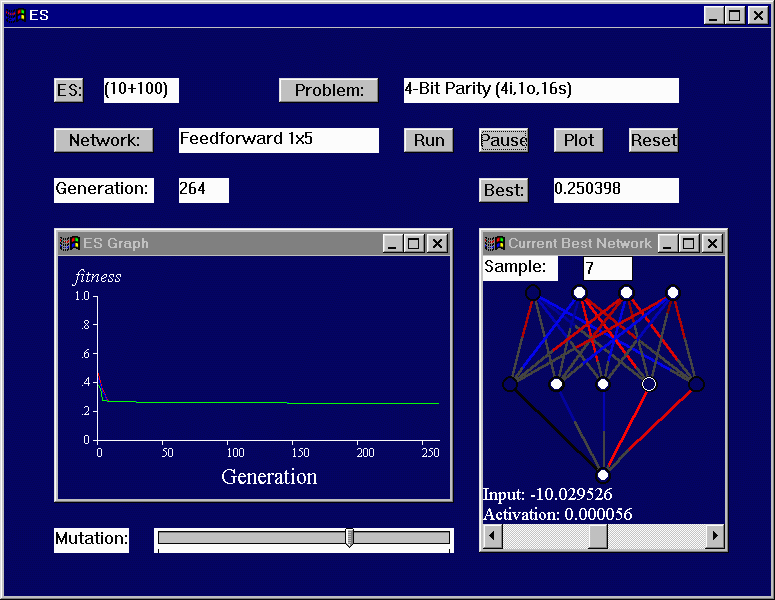
- You will notice in the "Current Best Network" window that a combination
of line length and brightness is now used, instead of just brightness.
This makes it very easy to compare the relative values of two weights, plus
it makes it possible for the weights to be easily adjusted by clicking
on the red/blue portion of the weight and dragging it to a new value.