Program Design

One advantage to writing GUI programs is that much of the program design is dictated by the structure of the window classes themselves. Often the only major design work involved in such projects arises when complex, novel graphical interaction is needed, or when a large subsystem (such as a neural network engine) is invoked to produce graphical output. In this project, I was able to obtain code for the evolution strategies algorithm and for the simulation of feedforward neural networks from Prof. Soraya Rana, so that the remaining design work was fairly minimal.

I. Class & Module Design

The following table (Figure 3.1) defines the classes, modules, and inheritance structure that I envisioned in my original design. The class names were designed to be consistent with those used in the ObjectWindows Library of Borland C++ 4.5, the implementation platform selected for this project.

Class: TESWindow
Module: eswindow.cpp
Description: This window class acts as a base class for all other window classes in the system. It is responsible for setting common style attributes, and for providing any services that are needed by all window classes.
Inherited from: TFrameWindow (Borland primitive)
Class: TESMainWindow
Module: esmain.cpp
Description: This is the window class for the main program window, the large window that first comes up when the program starts. The controls in this window must, at a minimum, allow the user to:
  • Load a training set, i.e. a specific set of inputs and output samples that are to be used to train a neural network to solve a problem.
  • Configure the type of ES and neural network topology to be used in solving a problem.
  • Run, Pause, and Resume the ES algorithm.
  • Spawn additional, specialized helper windows including, but not limited to:
    • A graph displaying the average, best, and worst fitness score for each successive generation (TESGraphWindow).
    • A representation of the weights, topology, and activity levels of a specific neural network (TNVisWindow).
    • A compact representation of all networks, living or dead, organized by generation (TGenerationWindow).
    • A representation of the "family tree" for a specific neural network (TFamilyTreeWindow).

Inherited from: TESWindow
Class: TESGraphWindow
Module: graph.cpp
Description: This window class displays a graph of the worst, best, and average fitness scores for each generation. Ideally, the user would be able to specify the scale used in the graph (linear, logarithmic, sigmoid, etc.), and be able to turn each of the three score graphs (worst, best, and average) on or off.
Inherited from: TESWindow
Class: TNVisWindow
Module: nvis.cpp
Description: This window is responsible for the visualization of a single neural network, which is really the heart of the project. In addition to depicting the edge weights, activity levels, and topology of a network, this window should allow the user to specify which sample the network is "running", and to monitor the inputs and activations (numerically) for a specific node. This window should allow the user to find out which activation functions are being used for each layer in a network, and to determine the network's fitness score.
Inherited from: TESWindow
Class: THeredityWindow
Module: heredity.cpp
Description: This window class serves as a base for TGenerationWindow and TFamilyTree, both of which display neural networks in a compact form. The purpose of this class is to provide common services needed to display neural networks in a compact form.
Inherited from: TESWindow
Class: TGenerationWindow
Module: genwin.cpp
Description: The purpose of this window class is to display, in compact form, all the neural networks that have lived and died in the course of an evolution strategies session. The networks will be organized in a grid, ordered vertically by generation, and horizontally by fitness score. By clicking on any of the compact network representations, the user will be able to view the family tree for a network (via TFamilyTreeWindow), or to view the network itself (through TNVisWindow).
Inherited from: THeredityWindow
Class: TFamilyTreeWindow
Module: tree.cpp
Description: This window class provides a depiction of the family tree for a given network, with all the networks in the tree represented in compact form. By clicking on any of these compact representations, the user can obtain a more detailed depiction of the selected network (via TNVisWindow).
Inherited from: THeredityWindow
Figure 3.1: Class definitions

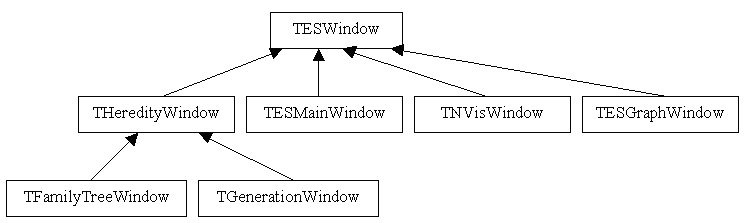
The following diagram (Figure 3.2) below illustrates the inheritance hierarchy for the classes defined in Figure 3.1.

Figure 3.2: Class hierarchy

II. User Interface Design

The purpose of this program is allow a user to train a population of networks to solve an input-output mapping problem using evolution strategies, and to monitor the networks that are created via such an algorithm. As such, it was an essential component of the user interface design that it allow the user to have quick and easy access to any network in the population at any time. It was also essential that the user be able to easily modify the ES parameters and the training set, both of which are integral components of the training process. Finally, it was necessary to provide the user with adequate feedback to determine the progress of the training session. The set of HTML-based prototypes that follow illustrate the user interface originally conceived to fulfill these needs.

NVIS - Neural Network Visualization Tool
ES: ([mu],[lambda])
Network: [network architecture]
Generation: [generation #]
Problem: [problem name]
Run   Plot   Pause   Reset
Best: [fitness score]


[room for child windows]


Figure 3.3: Prototype of window class TESWindow.

Figure 3.3 above represents the prototype for the main program window (TESWindow). The text rendered in bold represents buttons that can be pressed by the user. The user can press the ES button to modify evolution strategies parameters, the Network button to modify network architecture, and the Problem button to load a training set. The Run and Pause buttons are used to control the execution of the ES algorithm. The user can also bring up a number of child windows within the main program window. The Plot and Generation buttons bring up, respectively, a TESGraphWindow displaying the fitness scores that the ES algorithm has achieved so far, and a TGenerationWindow displaying the networks of each generation in a compact form. The Best button brings up a Network Editor window (TNVisWindow) which allows the user to view the network in the current population pool that has the best (lowest) fitness score. Finally, the Reset button starts the ES algorithm over from scratch.

Network Editor - [network name]
File
Sample: [sample #]


[visualization of neural network]


Figure 3.4: Prototype of window class TNVisWindow.
Figure 3.4 to the left represents the prototype TNVisWindow. On initialization, this window class receives a pointer to a neural network, which is displayed in the client area of the window. The user can also load and save neural networks through options on the file menu. The network will be displayed in the client area as a graph, with circles representing nodes, and line segments representing the weighted edges that connect these nodes. By clicking on a specific node, the user will be able to inspect the input and activation for that node. The input and activation for a given node will of course be a function of which sample in the training set is being run through the network; this sample will be output as a numeric index into the samples in the training file, displayed to the right of the "Sample: " text. This text will be an editable field, so that by typing in a new value the user can change the current sample.

Family Tree - [network name]
Zoom Network


[visualization of family tree]


Figure 3.5: Prototype of window class TFamilyTreeWindow.
Generations
Zoom Network


[visualization of all generations]


Figure 3.6: Prototype of window class TGenerationWindow.

Figures 3.5 and 3.6 illustrate, respectively, the prototypes for window classes TFamilyTreeWindow and TGenerationWindow. Both of these windows feature a "Zoom" menu, which allows the user to change the magnification of networks displayed in compact form in the client area, and a "Network" menu, which, when a network in compact form has been selected, allows the user to bring up a Network Editor window (TNVisWindow) or Family Tree Window (TFamilyTreeWindow) corresponding to the selected network. On initialization, TFamilyTreeWindow receives a pointer to a neural network, and displays the "family tree" of that network in the client area, using a compact representation for each network in the tree. The Generations window (TGenerationWindow) displays, in compact form, all the networks that have lived and died in the course of an evolution strategies session, organized by generation. Thus, from the Generations window, the user is able to select any network that is or ever was part of the population, and is able, through the "Network" menu, to bring up a TNVisWindow or TFamilyTreeWindow associated with that network. This makes every network, as well as its family tree, quickly and easily accessible to the user. This design assumes that enough memory will be available on the target platform to store all the networks in every generation. In practice this has proven to be a reasonable assumption.