Preliminary Research

I. Existing Visualization Systems

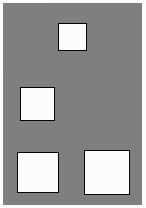
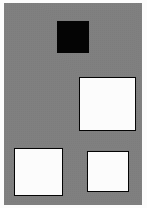
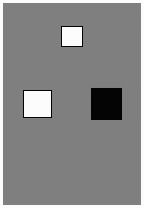
In "Visualizing Learning and Computation in Artificial Neural Networks", (Craven91), a survey of visualization schemes is presented, with critical evaluations and historical perspective. One of the earliest and most basic methods was that of the Hinton diagram, instances of which are reproduced below.

Hidden Node 1 Hidden Node 2 Output Node
To
Output

To/From
Hidden Nodes

From
Inputs
Figure 2.1: Hinton diagrams (Craven91). Used without permission.

In the diagrams in Figure 2.1, the boxes at the lowest level depict the weights entering a node from the input layer. The middle level shows weights that enter from or exit toward a hidden layer, while the top level shows weights that exit toward the output layer. The specific Hinton diagrams displayed here are for a network (not shown) with two inputs, a single hidden layer with two nodes, and an output node. In these diagrams, white boxes indicate positive weights, while black boxes are used for negative weights. The area of each box is proportional to the absolute value of the corresponding weight.
Though Hinton diagrams provide a compact display of information about each node, they suffer in that they fail to depict the topology of the network. Thus, while it may be easy to isolate specific purposes being served by each node in a network using Hinton diagrams, it is difficult to understand how the nodes are interacting and how the network is functioning as a whole. Another criticism is that the values represented are mapped to the area of shapes, which is more prone to perceptual errors than a one-dimensional mapping to length or angle would be.
The large figure below illustrates a Bond diagram, a visualization technique developed in 1990 which, in addition to displaying the weights associated with each node, also depicts the network's topology.


Figure 2.2: A Bond diagram (Craven91). Used without permission.

In this figure, the signs of the weights are again represented by color, with black triangles indicating negative weights and gray ones indicating positive. The length of the triangles (the altitudes) are proportional to the magnitude of the corresponding weight. The white circles each represent nodes, with the area of the circle being proportional to the bias associated with each node.
The advantage of the Bond diagram over the Hinton diagram is that it depicts the network's topology. It is still limited, however, in that it cannot display the nodes' activity levels for a specific instance of the problem being solved. Without this sort of concrete example, it is difficult to determine how a network is solving (or failing to solve) a specific problem. Another drawback to Bond diagrams is that it is difficult to compare the magnitude of the biases to those of the weights, since different shapes are used to represent the two quantities.

In addition to academic visualization schemes, I surveyed a number of shareware and commercial programs which contained visualizations of neural networks.

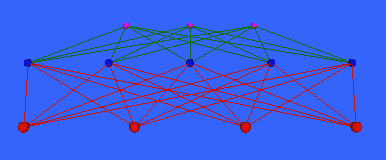
Figure 2.3: A VRML-based neural network visualization (Smith99).
Used without permission.
The image on the left (Figure 2.3) was captured from a web site featuring a 3D, VRML-based neural network tool. In this figure, the red nodes near the front are the input nodes, the blue nodes in the middle are the hidden nodes, and the red nodes near the back are the output nodes. Red lines are used to indicate weights emanating from the input layer, while green lines designate nodes that flow toward the output layer. Though the diagram depicts the network's topology, it does not give an indication of the relative strengths of the various weights. The activity levels are also not represented. Finally, it is questionable whether the use of 3D visualizations is appropriate for neural networks, since the geometric placement of nodes in space is arbitrary to begin with. By conducting a "fly-through" of this 3D world, one gains no additional information, since all the nodes and connections are apparent already from the given perspective.

Figure 2.4: Neural Planner network visualization
(Wolstenholme99). Used without permission.
This next screen shot (Figure 2.4) is from a program called Neural Planner. Similar to the previous visualization, the node types are color-coded, with red, green, and blue nodes designating input, hidden, and output nodes, respectively. The edges are not color-coded in this case, and again, we have no representation of the magnitudes of the edge weights or of the activity levels associated with each node. Another criticism of both this and the previous visualization scheme is that the biases associated with each hidden and output node are not represented in the figures.

Figure 2.5: QwikNet network visualization (Jensen98).
Used without permission.
Figure 2.5, generated by the QwikNet neural networks package, improves upon the previous two techniques by providing a rough indication of the strength of each edge weight. As you can see from the legend on the far left, the values of the edge weights are color-coded, from red, indicating "strong" weights of negative sign, to magenta, which is used to indicate strong weights of positive sign. A criticism of this method is that the mapping from colors to weights is not intuitive, i.e. there is no natural gradation from red to magenta that would let one guess the values of weights without memorizing the legend. Had the weights been color-coded using shades of gray, for example, with black representing the lowest weight and white the highest, one would be able to guess to which value an intermediary shade of gray would be assigned. This would also alleviate the lack of precision which is introduced in this visualization by having only seven colors with which to categorize weights.
An important feature of this visualization is that it depicts the biases, represented as weights emanating from the triangle-shaped nodes, in the same way in which it depicts the weights, so that biases and weights are easy to compare. This represents an improvement over the Bond diagram, with the only drawback being the additional clutter that is introduced into the figure by the presence of additional weights. In this visualization, node type is represented by shape, with triangles designating bias nodes, squares used to designate input nodes, and circles used for output and hidden nodes.

Figure 2.6: Trajan network
visualization (Hunter99).
Used without permission.
This next visualization (Figure 2.6) appears to be inspired by electrical circuit diagrams. Shape is again used to indicate node type, with circles used for input and output nodes, squares used for hidden nodes, and triangles used as a special case for hidden nodes in the first layer. This particular networks package, called Trajan, allows for unusual variations in topology during the training process. Here you see that some of the inputs are connected to a single node in the first hidden layer, while one input is connected to three hidden nodes. Also interesting in this visualization is the use of the vertical ellipsis to avoid extra clutter in the diagram. Though the figure does an excellent job of depicting the topology of the network, it fails of course to show the edge weights, the biases, and the activity levels associated with each node.

Our final picture (Figure 2.7), reproduced below from a screen shot of the EasyNN package, is in my opinion the best visualization scheme reviewed in this paper. The input, output, and hidden nodes are all color-coded, with bar graphs inside the hidden and output nodes which indicate the input, activation, bias, and even the error (determined no doubt using the back-propagation algorithm) associated with each node. The edge weights are proportional to the thickness of the lines used to draw the links, with green lines indicating positive weights, and red lines used for negative weights. Another important feature of this visualization is that it allows the input and output nodes to be identified with labels specific to the problem being solved. The network depicted, for example, has been trained to solve the addition problem, and its inputs are clearly labeled as "Number a" and "Number b", with the output labeled as "Total". Finally, it is important to notice that each node in the diagram is labeled with a unique number, which always makes it easier to keep track of things when comparing different networks that are attempting to solve the same problem.

Figure 2.7: EasyNN network visualization (Wolstenholme00). Used without permission.

II. Motivations

In the course of a number of informal experiments with neural networks a few years ago, I discovered that it can be very difficult to train neural networks to solve problems without the aid of a visualization tool. When a population of neural networks fails to converge on a solution, there are a host of variables to consider. The population may be too small, the rate of mutation may be too high, or the problem may simply be unsolvable with the given network architecture and choice of activation functions. The amount of feedback required for the user to actually diagnose the cause of a failure to converge was, in my experience, too large and the necessary degree of interactivity too complex to be practically accomplished with a text-based interface. I imagined that with a GUI-based tool, one could more easily train neural networks to solve problems, and that perhaps some problems which had previously seemed intractable with neural networks would, in light of the insights which a graphical tool could provide, prove possible to solve.
In surveying existing visualization tools, I found several weaknesses that were common among most or all of them. None of the methods or packages discussed in the previous section uses more than 16 colors to display a network. Clearly, the possible values for weights, biases, and activity levels constitute a continuum, so that using gradations of color hue, saturation, and intensity seemed a natural way to depict these quantities. Only Bond diagrams and the EasyNN technique depicted edge weights using continuously variable attributes such as line thickness and line length, and in both cases, I considered the specific attributes chosen to be less than optimal. In Bond diagrams, the large triangles necessary to depict strong edge weights take up a great deal of screen space, while using line thickness, as EasyNN does, does not allow for a very broad range of values to be displayed. The lines can only be so thick before they begin to obscure one another. Finally, with the exception of EasyNN, none of the visualization techniques I saw attempted to display the activity levels associated with each node for a given sample. Though EasyNN uses bar graphs within each node to display the node's input, activity level, and error, this approach is limited in that it does not scale well to large networks. In order for the bar graphs to be visible, the nodes must all be displayed at a certain minimum size, which may become prohibitive when there are a large number of nodes in a given layer.
All of the visualization schemes that I found were concerned with what I will call network visualization, i.e. depiction of a single neural network solving a single instance of a problem in a training set. When the genetic algorithm is used to train a population of networks, what I will call heredity visualization, namely depiction of the hereditary relationships between networks in a population across multiple generations, has not, as far as I know, been attempted as of yet. This type of visualization might prove useful not only in solving problems with neural networks, but in gaining a better understanding of the evolutionary process in general.

III. Prototypes

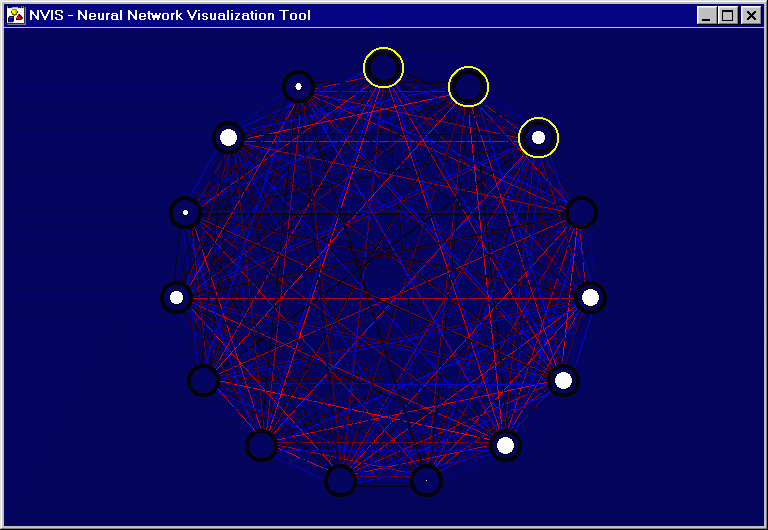
Figure 2.8: Prototype network visualization with 15 nodes.

Figure 2.8 illustrates the prototype visualization that I developed before beginning this project. My work up until this time had been with Hopfield networks, which are quite a bit different from feedforward networks, but for our purposes suffice it to say that in a Hopfield network, every node acts as a hidden node, with some of the hidden nodes doubling as output nodes. All nodes are fully connected, which suggests the circular display you see above.
In this visualization, the value of each weight is proportional to the intensity of the color used to display it. Thus, for every blue line you see on the screen, the shade of blue used to draw the line is somewhere between RGB color (0,0,0) and (0,0,255), where the blue component is a linear function of the edge weight. Color in this case is used not to indicate sign, but direction of the weights, with blue lines being used to denote links that run in the clockwise direction, and red lines used to denote counter-clockwise. Some indication of direction was necessary since, unlike in the case of feedforward networks, the signals are not always running in a predetermined direction (i.e. from top to bottom), and I did not want to draw arrows at the ends of my lines for fear it would clutter up the display. The activity levels associated with each node are proportional to the diameter of the white circles inside the node. Finally, the yellow circles around three of the nodes serve to designate those nodes as output nodes.
The input nodes are not shown in this visualization. The reason for this is that, in a Hopfield network, the input nodes are not as directly involved in the computation as the hidden and output nodes. The details of this are not relevant to this project; the interested reader is referred to the Hopfield Networks web page (DeSilva97).
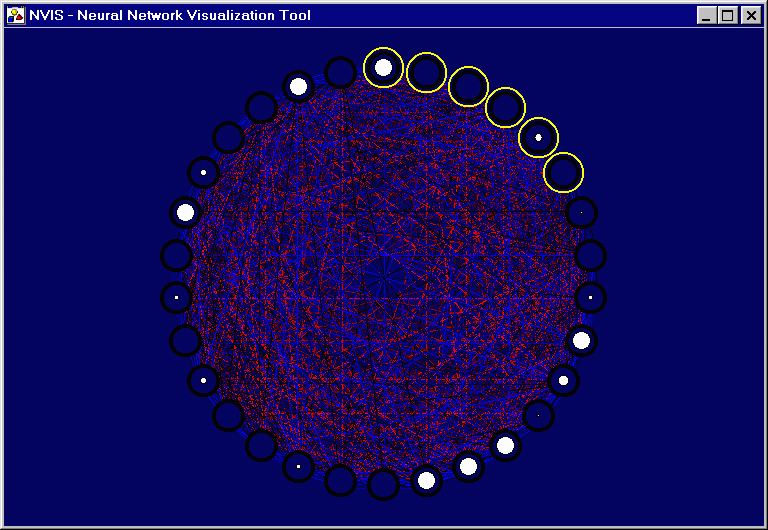
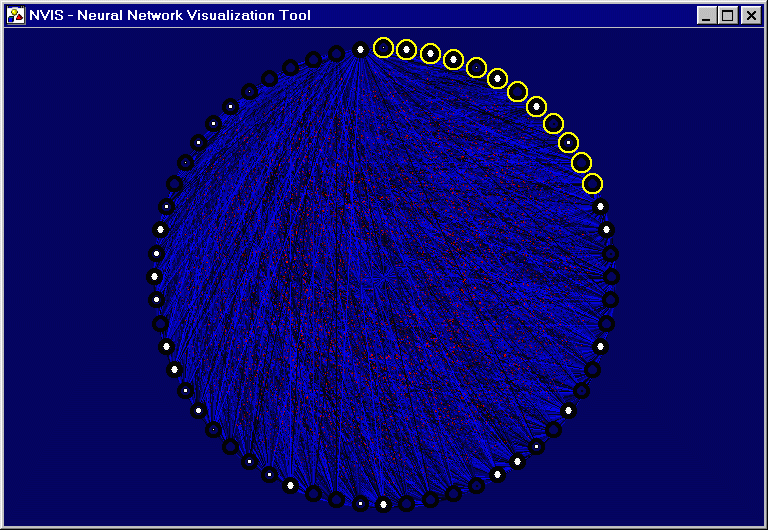
A few simple experiments served to illustrate a problem that will come up again in this report, of scalability. The following two pictures show my prototype visualization applied to a network with 30 nodes, then to a network with 60 nodes.
Figure 2.9: Prototype network visualization with 30 nodes.


Figure 2.10: Prototype network visualization with 60 nodes.